Settings
The document settings are managed through the main Moodle activity settings page. In addition to Moodle’s standard activity settings, the plugin provides settings for document dimensions and unique codes.
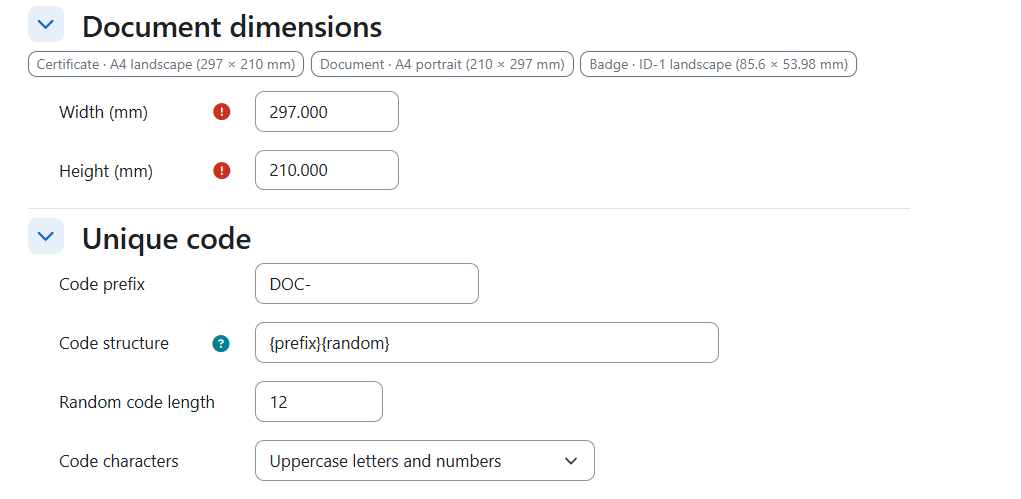
Document Dimensions
Width
Enter the document width in millimetres (mm).
Height
Enter the document height in millimetres (mm).
Recommended Dimensions
Use the following dimensions for your preferred document format. All measurements are in millimetres (mm).
- Certificate — A4 landscape 297 x 210
- Document — A4 portrait 210 x 297
- Badge — ID-1 landscape 85.6 x 53.98
Unique Code
Code Prefix
Enter a prefix for the unique code.
Code Structure
Define the code structure using the available tokens: prefix, random, course ID, user ID, and year.
Random Code Length
Specify the length of the random part of the code.
Code Characters
Select the character format:
- Uppercase letters and numbers
- Uppercase letters only
- Lowercase letters and numbers
- Numbers only
- Digits with hyphens
Was this page helpful?
Please tell us what went wrong.
255 characters remaining
Thanks! Your feedback helps us improve this page.
Please wait a few seconds before trying again.